AI-generated photos are great for dealing with one picture; when you upload two low-quality photos, it will take a long time to analyze facial structures.
Poor-quality couple photos include:
- Blurry images or obscured facial features
- Strange Angles between both partners
- Cluttered backgrounds cover characters
Why It Happens
- Low resolution starves the model of facial detail
- Strange angles make the AI fill in gaps with guesses
- AI first deals with the background, not partners
How to Fix It:
- Select clear, front-facing photos with clear facial features
- Mid-angle between both partners
- Crop out background noise
High-resolution shots with natural, matching lighting ensure the AI can analyze both partners equally. Eliminating extra people and cluttered backgrounds allows the AI model to focus strictly on key facial traits and physical features.
2. Making Every Character in AI Couple Photo Look Inconsistent
Even after uploading two clear reference photos, you may notice that the generated faces look inconsistent from one image to another. Repeatedly regenerating images can sometimes make the issue worse, resulting in wasted credits and mismatched portraits.
Why It Happens:
- AI may mix facial features between partners
- Unclear Couple Identities
- Lack of identity anchors
How to Fix It:
- Add negative prompts to warn AI like:
- “No mixed facial features”
- “No swapped identities”
- “No duplicated facial features”
- Keep Each Partner’s Identity Clear
- Describe each person separately
- Define 2–3 distinctive features
- Keep their features clearly different
- Strengthen the Identity Anchor
- Repeat key facial features
- Keep the same identifiers throughout
- Avoid conflicting appearance details
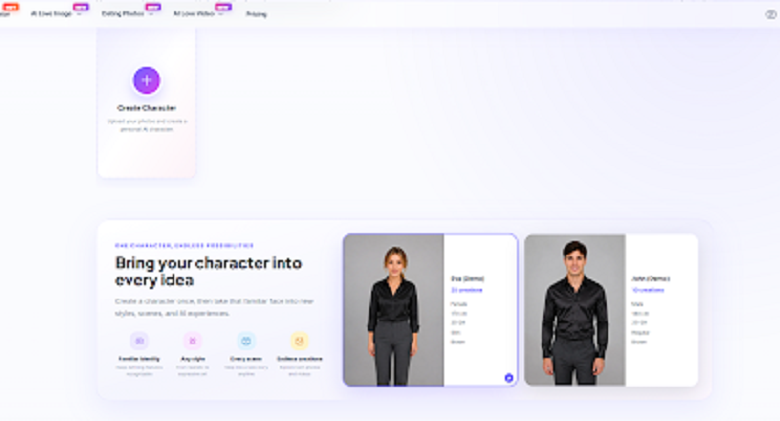
Maintaining consistent characters can be challenging because AI generation involves a level of randomness. If refining prompts becomes too time-consuming, platforms like AIKissfiy’s AI Character Generator can help you create your characters and place them in different scenes and styles without starting from scratch each time.
3. Creating Unrealistic Facial Expressions and Skin Details
When you expand to detect your photo, you will find many small mistakes, especially your facial expressions and your skin being over-smoothed, which look so awkward.
Why It Happens:
- AI prioritizes overall facial harmony
- AI tends to generate a generic “beautiful” face
- AI relies on average skin texture datasets
How to Fix It:
- Describe specific facial expressions like:
- “Soft, relaxed smile”
- “Gentle eye contact”
- “Natural facial expression”
- Specific facial features include:
- “Defined cheekbones”
- “Soft almond-shaped eyes”
- “Natural full eyebrows”
- “Subtle smile lines”
- “Slightly rounded jawline”
- Specify natural skin texture like:
- “Natural skin texture with subtle pores”
- “Realistic skin texture without excessive smoothing”
- “Subtle skin imperfections for a natural look”
By describing authentic expressions and specifying natural skin textures, you can create results that feel more realistic, personal, and true to the original photo.
4. Making AI Couple Photos Feel Like Templates
When you finally adjust your photos to look realistic, you may find that your AI couple photos look too similar to popular templates, featuring the same viral social media aesthetics instead of reflecting your unique relationship.
Why It Happens
- AI is trained on overused beauty aesthetics
- AI struggles to understand a couple’s natural, genuine reactions
- AI tends to maintain generic symmetry
How to Fix It
- Pick one style you like — AI usually works better with one template at a time
- Add personalized reaction prompts to the generic templates
- “Have one person look at the other with a soft smile”
- “Have them share a soft, affectionate gaze”
- “Have them gently kiss each other in a tender moment”
- Try daily and romantic poses and angles prompts include:
- “Show one person gently holding the other’s hand”
- “Have them lean close with natural smiles”
- “Have one person softly touch the other’s cheek”
Trendy templates may look beautiful, but adding some emotion and pose promts can help you create romantic and elegant couple photos that truly represent your relationship.
5. Using Unrealistic Romantic Scenes and Lighting
After creating stylized couple photos, you may find that the images still lack realistic romantic scenes and lighting, which can make the final results look artificial.
Why It Happens
- The background does not match the overall photo style
- The characters do not blend naturally with the lighting environment
- AI often adds excessive lighting to remove shadows and make images look brighter
How to Fix It
- Match romantic scenes with suitable styles
- Sunset scenes for warm and dreamy photos
- Beaches for seaside styles
- Forests for cool and elegant looks
- Keep the characters and background visually consistent
- Match outfits with the setting
- Keep colors and tones cohesive
- Make poses fit the atmosphere
- Use directional lighting techniques
- Side lighting for depth
- Rim lighting for separation
- Environmental lighting for a natural look
Choosing the right setting, keeping visual elements consistent, and using natural lighting can make your AI couple photos feel more cohesive, romantic, and realistic.
6. Missing Personal Stories and Emotional Details
A romantic photo is not just an image; it should express the couple’s emotions and tell a love story. However, many AI-generated images miss this emotional connection.
Why It Happens
- AI cannot truly understand a couple’s intimate moments
- AI focuses only on visual perfection
- AI captures vague details about your love story
How to Fix It
- Emphasize sentimental details like:
- “Have them look at each other with a warm, familiar expression”
- “Show one person looking at the other with quiet affection”
- “Have them react to each other with a soft, caring expression”
- “Show the comfort and closeness in the way they look at each other”
- Focus on genuine moments instead of visual perfection, including:
- “Show them laughing after one person says something funny”
- “Have one person quietly look at the other while they are talking”
- “Show them hugging naturally after a kiss”
- Add personal and romantic love story details like:
- “Add personal and romantic love story details”
- “Share a kiss under the city lights”
- “Embrace on the beach side”
- “Walk hand in hand through the night streets”
- “Travel in the romantic castle city”
AI relies on statistical defaults, making it hard to capture narrative, so small details, such as a shared laugh, a gentle glance, or natural physical closeness, can help AI create a more authentic couple portrait that reflects your unique love story.
7. Creating AI Couple Photos That Feel Too Artificial to Share
Personal emotions, romantic settings, and unique details can make AI couple photos feel more personalized, but the results may still look artificial or lack authenticity.
Why It Happens
- Too many adjustments can confuse the AI model
- Fixing one detail may create another mistake
- AI may struggle to capture subtle emotions
How to Fix It
- Restart with the revised prompt in a new AI model
- Make targeted corrections instead of repeated edits
- Use clear prompts to describe subtle expressions
With the right prompts and targeted adjustments, you can create AI couple photos that feel more natural, personal, and authentic.
How to Create More Realistic and Meaningful AI Couple Photos Step by Step
Randomly switching between tools rarely leads to great results. Instead of repeatedly adjusting prompts, follow these steps to create realistic, emotion-driven AI couple photos with ease.
Step 1: Choose Clear Photos That Show Both Partners
Clear, well-lit photos help the AI recognize facial features and create more accurate results.
What to do:
- Upload 3–5 front-facing photos with visible facial details
- Choose natural lighting—avoid harsh shadows or overly dark images
- Avoid extreme head tilts—a slight angle is fine, but too much tilt confuses the AI
Privacy tip: Check how the AI tool handles your images before uploading. Platforms like AIKissfiy automatically delete uploaded photos within three days after you download your generated content.
Step 2: Create Authentic Couple Connections and Expressions
A realistic AI couple portrait should show more than two people standing together. Clear descriptions of their positions, actions, and interactions help create natural body language and a stronger sense of connection.
Start with clear physical action prompts like:
Describe what the couple is doing and how you are positioned before adding emotional details or atmosphere.
- “Two people facing each other, gazing into each other’s eyes, with a warm sunset glow.”
- “A couple walking hand in hand along the beach, smiling at each other in the soft evening light.”
- “A couple sitting closely together on a cozy sofa, gently holding hands in natural window light.”
Use specific expression and interaction prompts, such as:
- “A couple looking at each other warmly, with relaxed, natural smiles that are not overly wide.”
- “A couple gently leaning their heads together, sharing a quiet laugh with soft eye contact.”
- “A couple standing close together in a relaxed pose, exchanging a subtle smile and gentle eye contact.”
What to avoid:
Avoid vague prompts like:
- “make expressions look natural”
- “make the couple look romantic”
- “create a natural and elegant pose”
Real-world tip:
Describe the couple’s physical interaction first, then add specific expressions and body language. Simple details like holding hands, leaning closer, or sharing a subtle smile can make their connection feel more natural and believable.
Step 3: Add Personal Romantic Scenes
The right scene can make your AI portrait feel more personal and special. Include a specific place, shared activity, or meaningful moment that reflects your relationship.
Turn personal details into specific prompts:
- Location: “A couple walking along the beach where they had their first date, with soft sunset light and gentle waves in the background.”
- Shared activity: “A couple cooking dinner together in a cozy kitchen, laughing while preparing their favorite meal.”
- Personal objects: “A couple sitting together on a sofa, holding a small photo album from their first trip together.”
- Seasonal details: “A couple walking through a quiet autumn park, holding hands as fallen leaves cover the path.”
- Dream destination: “A couple standing together on a quiet street in Paris at sunset, sharing a gentle smile near a small outdoor café.”
Real-world tip:
Think about one real memory or meaningful detail and turn it into a visual description. The more specific the detail, the easier it is for AI to create a couple portrait that feels personal rather than like a generic romantic template.
Step 4: Refine Details for a Natural Photography Feel
Once the core composition is set, inspect the image for subtle flaws that might break realism. Pay attention to facial features, hands, clothing, and body proportions, as small inconsistencies can make an AI-generated photo look artificial.
What to check:
- Relaxed smiles and genuine eye contact
- Natural skin texture
- Hands—count the fingers and check positioning
- Background—any weird shapes, extra limbs, or floating objects?
Final check: Zoom your image to 50% and hold it at arm’s length. If nothing looks wrong at that distance, you’re ready to share.
FAQ
What makes an AI couple photo look unrealistic?
Poor-quality input photos and generic prompts are usually the culprits. Start with clear, front-facing images and add specific personal details like glasses, hairstyles, or dimples.
Why does your partner’s face keep changing between images?
That’s just AI’s random nature at work. Lock in consistency by repeating descriptive details like face shape, hair color, and distinctive features across all your prompts.
What kind of prompts actually work for natural-looking AI couple photos?
Skip vague words like “romantic.” Instead, try this formula: action + setting + specific expression—for example, “Walking hand in hand through a sunlit park with gentle smiles.”
Why do your AI couple photos look overly polished and fake?
AI defaults to an airbrushed look. Counter this by adding “natural skin texture” to your prompt and avoiding dramatic lighting effects.
How can you create great AI couple photos without spending too much time?
Start with quality photos and detailed prompts. Platforms like AIKissfiy simplify the process with pre-built styles that maintain facial consistency automatically.
Conclusion
Creating realistic AI couple photos isn’t just about choosing better styles or adding more effects. The seven common mistakes in this guide show how details such as input photos, expressions, lighting, romantic settings, and personal stories can affect the final result. Paying attention to these details can make your photos feel more natural and true to your relationship.
The goal isn’t perfection. It’s creating photos that feel like you. Tools like AIKissfiy make it easy to turn your couple photos into natural, personalized images. The best AI couple photos shouldn’t look like random AI creations—they should feel like moments that truly belong to the two of you