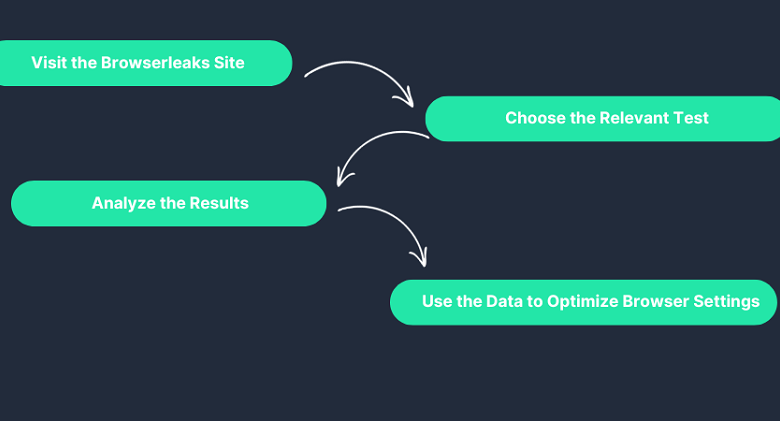
Most internet users assume that clearing cookies, enabling private browsing mode, or using a VPN is enough to protect their privacy online. In reality, modern tracking systems rely on far more sophisticated techniques. Websites can analyze browser fingerprints, detect hardware characteristics, identify network leaks, and gather dozens of technical signals without storing a single cookie.
This is where BrowserLeaks has become one of the most widely used privacy auditing tools on the web.
For cybersecurity professionals, developers, privacy enthusiasts, and businesses managing sensitive online operations, BrowserLeaks offers a practical way to see exactly what information a browser exposes. The results can be surprising. In many cases, users discover that their browsers reveal significantly more data than expected.
Understanding how to interpret these tests is an important step toward improving online privacy.
What Is BrowserLeaks?
A Diagnostic Tool for Browser Privacy
BrowserLeaks is a collection of browser testing tools designed to reveal the information websites can gather during a normal browsing session.
Rather than tracking users, the platform demonstrates how tracking works. It examines browser behavior, network configuration, hardware characteristics, and fingerprinting signals that are commonly used by websites and fraud detection systems.
Think of it as a privacy health check.
Just as a medical examination identifies potential risks before they become problems, BrowserLeaks helps users identify browser vulnerabilities before those vulnerabilities are exploited for tracking or profiling.
Why Browser Privacy Audits Matter
Tracking Has Moved Beyond Cookies
A decade ago, cookies were the primary mechanism for identifying users online.
Today, websites increasingly rely on browser fingerprinting and behavioral analysis. Modern systems collect information about screen resolution, graphics hardware, installed fonts, time zones, browser versions, and networking characteristics.
These signals are combined into a unique browser fingerprint.
Even users who regularly delete cookies can often be recognized through these fingerprints.
A BrowserLeaks audit reveals how visible those identifiers are and how effectively a browser protects them.
Start With the Fingerprinting Tests
Understanding Your Browser’s Uniqueness
One of the most important sections of BrowserLeaks focuses on browser fingerprinting.
The platform evaluates dozens of browser characteristics and displays the information that websites can collect automatically.
This includes browser version, operating system, language preferences, screen dimensions, installed plugins, and device capabilities.
The goal is to understand uniqueness.
The more uncommon a browser configuration appears, the easier it becomes for websites to distinguish that browser from others.
For privacy-conscious users, this is often the most revealing part of the audit.
Many discover that seemingly minor customizations contribute significantly to fingerprint uniqueness.
Check the Canvas Fingerprint
Hidden Graphics Can Reveal Identity
Canvas fingerprinting has become one of the most widely used tracking techniques.
BrowserLeaks includes a dedicated Canvas test that demonstrates how websites generate unique identifiers using invisible graphics.
The browser renders a hidden image, and the resulting output is analyzed. Differences in graphics hardware, drivers, operating systems, and rendering engines create subtle variations that become part of a fingerprint.
The test allows users to see exactly what image data websites can access.
Because canvas fingerprints often remain stable over time, they are frequently used by advertising networks and anti-fraud systems.
Analyze WebGL Data
Your Graphics Hardware Leaves Clues
The WebGL section focuses on three-dimensional graphics rendering.
WebGL provides websites with access to hardware-accelerated graphics capabilities. In the process, browsers expose information about graphics cards, drivers, rendering engines, and system configurations.
These details help create highly distinctive fingerprints.
A BrowserLeaks audit shows how much information is being exposed and whether the browser reveals more hardware details than necessary.
For users concerned about privacy, WebGL data often represents one of the most significant fingerprinting vectors.
Test for WebRTC Leaks
VPN Users Should Pay Attention
One of the most popular BrowserLeaks tests examines WebRTC behavior.
WebRTC is a browser technology that enables real-time communication for applications such as video conferencing and voice calls.
While useful, WebRTC can sometimes reveal local and public IP addresses, even when a VPN is active.
This is known as a WebRTC leak.
The BrowserLeaks test immediately shows whether the browser exposes IP information that users expect to remain hidden.
For anyone relying on VPNs for privacy, this test is particularly important.
Examine Fonts and System Information
Small Details Add Up
BrowserLeaks also evaluates installed fonts and system-level information.
Fonts may seem insignificant, but they contribute substantial entropy to browser fingerprints. Every installed application potentially adds new fonts, creating unique combinations that distinguish one device from another.
The platform reveals exactly which fonts are detectable by websites.
Similarly, BrowserLeaks reports hardware information, language settings, time zones, and localization data.
Individually, these signals may appear harmless. Combined, they become powerful identifiers.
Understanding the Results
Exposure Does Not Always Mean Risk
A common mistake is assuming that every exposed signal represents a vulnerability.
Some information is necessary for websites to function correctly. Screen resolution, language preferences, and browser capabilities often improve usability and compatibility.
The key question is not whether information exists.
The question is how much information contributes to uniqueness.
A browser that exposes common values shared by millions of users presents a different privacy profile than a browser with highly unusual characteristics.
The audit should therefore focus on distinctiveness rather than raw data volume.
How Modern Browsers Address Privacy Risks
Anti-Fingerprinting Measures Continue to Evolve
Browser developers increasingly recognize the privacy challenges revealed by BrowserLeaks.
Browsers such as Mozilla Firefox and Brave include anti-fingerprinting technologies designed to reduce information exposure and standardize browser outputs.
Meanwhile, specialized solutions such as antidetect browser Gologin focus on managing browser identities through isolated profiles with controlled fingerprint configurations.
These approaches address different privacy needs, but both reflect the growing importance of browser identity management.
Why Businesses Use BrowserLeaks
Privacy Audits Are Now Operational Audits
BrowserLeaks is no longer used solely by privacy enthusiasts.
Advertising agencies, cybersecurity teams, software developers, and e-commerce operators increasingly run BrowserLeaks audits to understand how their environments appear to external systems.
Platforms rely heavily on browser fingerprints for security and fraud detection. Knowing what those systems can see helps businesses identify risks, improve consistency, and troubleshoot operational issues.
In many organizations, browser audits have become part of routine security assessments.
The Bottom Line
BrowserLeaks provides one of the clearest windows into how websites perceive a browser.
By testing fingerprinting signals, canvas rendering, WebGL behavior, WebRTC exposure, fonts, and system information, it reveals the technical details that often remain hidden from users.
For individuals, the platform offers valuable privacy insights. For businesses, it serves as a practical tool for understanding browser identity and risk exposure.
In 2026, online privacy is increasingly defined by what browsers reveal rather than what users intentionally share.
A BrowserLeaks audit helps make that invisible layer visible.